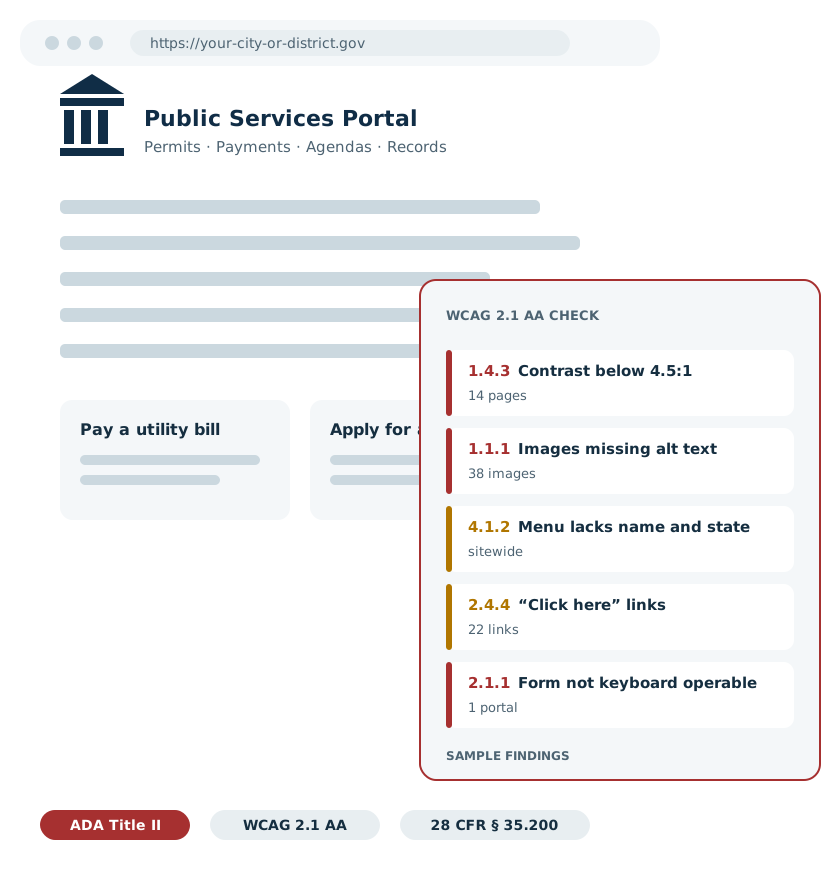
ADA Title II Website Compliance for Government, Schools & Universities
The Department of Justice has set WCAG 2.1 Level AA as the enforceable standard for state and local government websites, with deadlines of April 26, 2027 and April 26, 2028. ADA Site Monitor runs the initial assessment that shows where your site stands, then monitors it every month. The monitoring is independent: monitoring is the only thing we sell, so nobody is grading their own work.
Sources
- 1What does ADA Title II website compliance require?
- 2When are the ADA Title II compliance deadlines?
- 3What does WCAG 2.1 AA require in practice?
- 4Which web content does the rule cover?
- 5What does the initial assessment include?
- 6The order we work in
- 7What does the monthly monitoring service include?
- 8Can an automated scan certify ADA compliance?
- 9Why does independent monitoring matter?
- 10Can private businesses get the same monitoring under Title III?
- 11What are WCAG Levels A, AA and AAA?
- 12ADA Title II compliance questions
Key takeaways
- What is the ADA Title II web rule? A Department of Justice regulation, 28 CFR 35.200, issued in April 2024. It requires state and local governments to make their web content and mobile apps conform to WCAG 2.1 Level AA.
- Who has to comply? State and local government entities, public departments and agencies, public K-12 schools and districts, and public colleges and universities. The duty stays with the entity even when a vendor runs the website.
- What are the deadlines? April 26, 2027 for public entities serving 50,000 or more people. April 26, 2028 for entities under 50,000 and for special district governments.
- What does ADA Site Monitor do? Independent monitoring only. An initial assessment that inventories your web properties and tests them against WCAG 2.1 AA, then monthly monitoring with a timestamped record. We sell no hosting, design or content services to the entities we monitor.
- How does it work? You get a property inventory, human-verified findings in priority order and a monthly report. Your own IT staff or web vendor makes the fixes and we verify each one. To start, write to Monitor@ADAsiteMonitor.com for a scoping call and a written quote.
What does ADA Title II website compliance require?
Title II of the Americans with Disabilities Act requires state and local governments to make their programs and services accessible to people with disabilities. Since April 2024 that duty carries a technical standard for the web: WCAG 2.1 Level AA.
In detail
The regulation is 28 CFR § 35.200. It covers the web content and mobile apps a public entity provides or makes available, directly or through contractual, licensing or other arrangements. The standard it points to, Web Content Accessibility Guidelines 2.1 Level AA, was written by the World Wide Web Consortium and is the same benchmark courts and agencies were already citing. What changed in 2024 is that the benchmark became the law's own measuring stick for Title II entities, with dates attached. The full set of required checkpoints is on our WCAG 2.1 AA checklist.
When are the ADA Title II compliance deadlines?
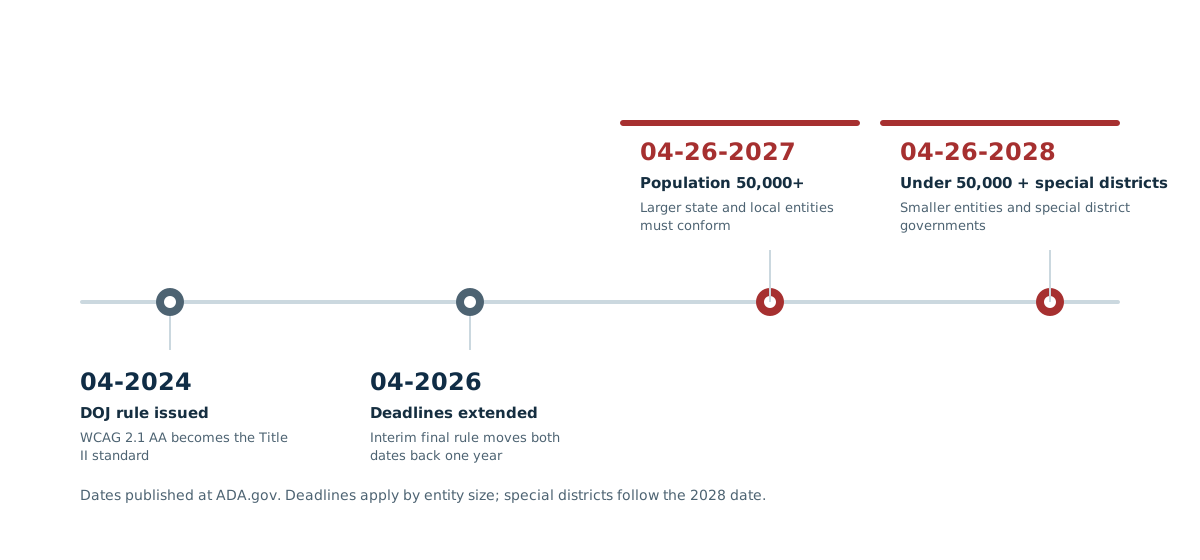
April 26, 2027 for public entities serving 50,000 or more people. April 26, 2028 for entities under 50,000 and for special district governments. The DOJ moved the original dates back one year in an April 2026 interim final rule.
In detail
| Public entity | Compliance deadline | |
|---|---|---|
| Larger entities | Population of 50,000 or more | 04-26-2027 |
| Smaller entities | Population under 50,000 | 04-26-2028 |
| Special districts | Special district governments | 04-26-2028 |
Two things are worth saying plainly. These are the dates the technical standard becomes enforceable for your entity size, not the dates the ADA starts to apply; Title II has covered government programs and services, websites included, all along. And a website that meets the standard in April 2027 can drift out of it by June, because sites change. That is the reason monitoring exists. The deadline details are published at ADA.gov, and our deadline guide walks through how to use the time that is left.
What does WCAG 2.1 AA require in practice?
WCAG 2.1 Level AA is a set of testable success criteria built on four principles: content must be perceivable, operable, understandable and robust. In practice, most government site gaps fall into a handful of recurring categories.
WCAG comes in three conformance levels. Level A is the minimum: the barriers that shut people out entirely. Level AA adds the barriers most users with disabilities actually hit day to day, color contrast among them. Level AAA is the strictest tier, and no regulation requires it. The Title II rule requires meeting the Level A and Level AA success criteria together, which is why every test we run is against that combined set: 50 checkpoints in all, listed one by one on the WCAG 2.1 AA checklist.
Text alternatives
Every meaningful image, chart and icon needs alt text that does the same job as the picture. Decorative images are hidden from screen readers. That is success criterion 1.1.1.
Color contrast
Normal text needs a contrast ratio of at least 4.5:1 against its background; large text needs 3:1. Light gray on white fails. That is criterion 1.4.3.
Keyboard operation
Every menu, link, form and widget has to work with a keyboard alone. A permit portal a resident cannot tab through is a barrier, whatever it looks like.
Clear link purpose
A link has to make sense from its text and context. “Click here” and “read more” fail; “Read the 2026 budget” passes. That is criterion 2.4.4.
Labeled forms and controls
Form fields need programmatic labels and understandable error messages, and custom controls have to expose their name, role and state to assistive technology, criterion 4.1.2.
Accessible documents and media
PDFs, Word files and spreadsheets need proper tags and reading order. Video needs captions; audio needs transcripts. Our document guide covers what that means in practice.
The full standard is published by the W3C as WCAG 2.1.
Which web content does the rule cover?
More than the main website. The rule reaches departmental sites, online permitting and payment portals, published agendas and minutes, forms, and web content a third party provides on the entity's behalf.
In detail
- Departmental websites
Police, fire, public works, parks, utilities; each department's pages are the entity's pages. - Portals and applications
Permitting, licensing, utility payments, job applications, records requests and citizen service portals. - Documents
Council and board agendas, minutes, budgets, forms and notices that people currently use to take part in public life or access a service. - Vendor-run content
The DOJ's own example is a county page built and updated by a web design company. The county still answers for it. Outsourcing the website does not outsource the obligation.
The rule also writes down real exceptions: archived web content that meets all four of the rule's conditions, preexisting conventional documents that are no longer in use, posts from members of the public, individualized password-protected documents, and social media posts made before the compliance date. The DOJ fact sheet walks through each one, and our guide to vendor-run websites covers the responsibility question in depth. An exception narrows the checklist; it does not remove the entity's other ADA duties.
What does the initial assessment include?
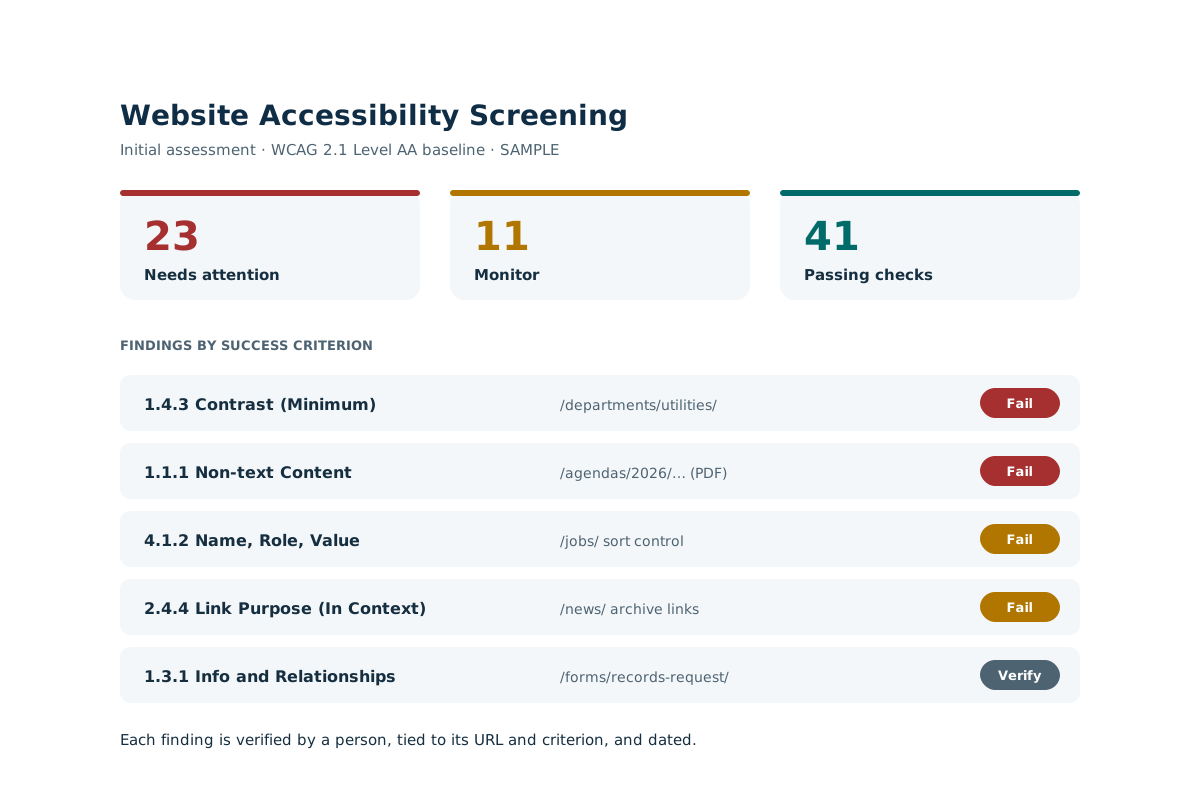
A baseline, in writing: which web properties you actually have, how each one measures against WCAG 2.1 AA, and which findings matter first. The initial assessment page describes every deliverable.
Property inventory
The main site, departmental sites, portals and document libraries, listed in one place. Most entities find properties they had lost track of.
Baseline WCAG 2.1 AA testing
Automated scanning of pages and documents against the standard's testable criteria, recorded with date, URL and test version.
A person checks every finding
No raw scanner export. A person verifies each finding before it reaches your report, so your staff never chase a false positive. Verifying the scanner's findings is not the same as manually testing every WCAG criterion; that deeper review is the optional add-on.
Findings by URL and criterion
Each defect tied to the exact page or document and the WCAG success criterion it fails, with plain-language remediation guidance.
Remediation priorities
Ordered by user impact and exposure, so the fixes that remove real barriers come first, ahead of cosmetic ones.
A report people can act on
Written for the administrator who owns the obligation and the IT staff or vendor who will do the fixing, including the scope of manual testing still worth doing. See an example report.
The order we work in
- Step 01Inventory every property: the main site, departmental sites, portals, and the document libraries behind them.
- Step 02Run the baseline assessment against WCAG 2.1 AA and verify the findings by hand.
- Step 03Deliver the report: findings by URL and criterion, priorities, and the recommended scope of further manual testing.
- Step 04Your IT staff or web vendor makes the fixes. We re-test each one and mark it verified, with the date.
- Step 05Monthly monitoring begins, so the baseline you paid for does not quietly rot as the site changes.
What does the monthly monitoring service include?
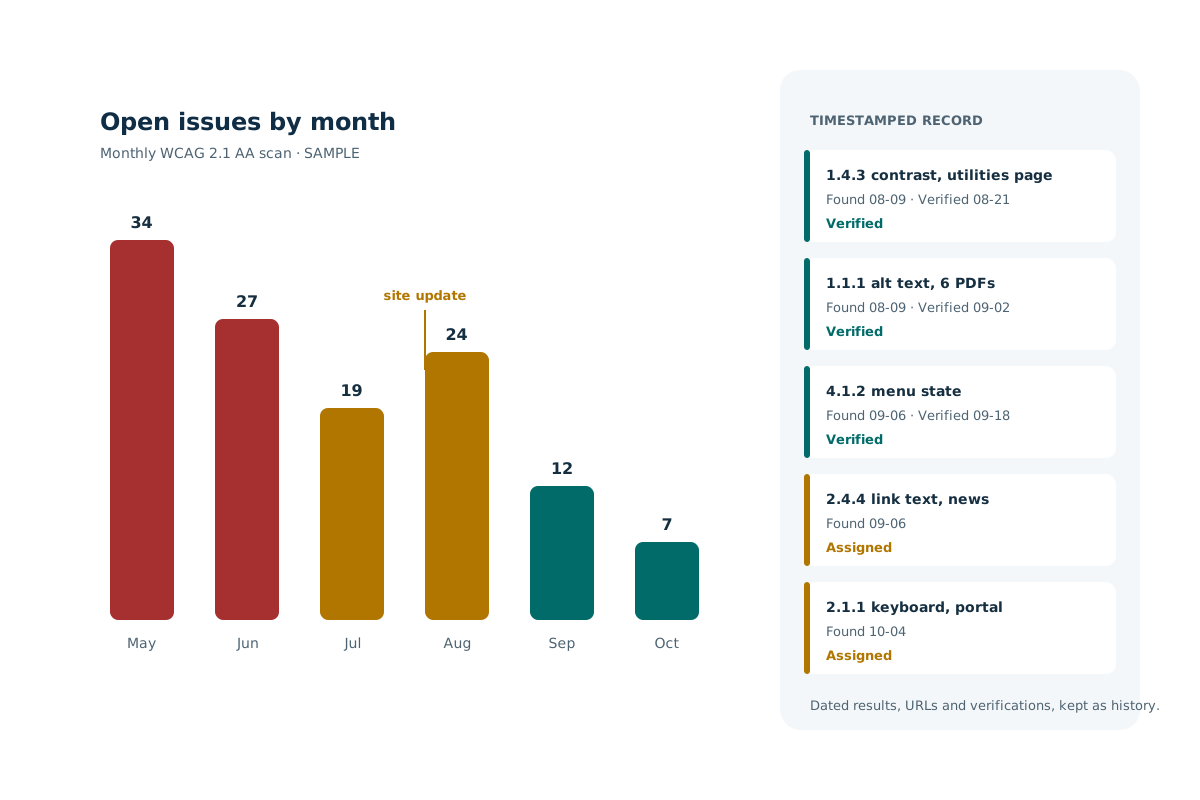
A scheduled WCAG 2.1 AA scan of your properties every month, regression checks on anything that changed, a report your administrators can file, and a timestamped record of when each issue was found and when our next scan verified it was fixed. The full service is described on the monthly monitoring page.
In detail
- New content, caught
New pages, new PDFs and new third-party embeds enter the next scan automatically. The content that creates new gaps is almost always content added after the audit. - Regression detection
A redesign, a plugin update or a new form can reopen issues that were fixed. The monthly scan compares against your baseline and says exactly what changed. - Remediation tracking
Findings are assigned to your IT staff or website vendor, carried month to month until fixed, and re-tested before they are marked closed. - A timestamped record
Dated scan results, affected URLs and fix verifications, kept as a running history. It documents a serious, continuing accessibility effort. It is not, by itself, a legal determination of compliance, and we will never present it as one.
Can an automated scan certify ADA compliance?
No. The W3C is plain that automated tools cannot test every accessibility requirement; some checks take human judgment. We sell monitoring, verified findings and a documented record. We do not sell certificates, because an honest vendor cannot.
In detail
Automation is good at what it measures: contrast ratios, missing alt attributes, unlabeled fields, invalid accessibility markup. It cannot tell you whether alt text actually conveys what the image means, whether a page makes sense read aloud by a screen reader, or whether the keyboard order of a payment flow is usable. The W3C, which wrote the standard, says it directly: some accessibility checks cannot be automated and require manual review. Our guide to automated scans versus human review draws the line in detail.
Worth saying just as plainly: the rule does not require you to buy a monitoring service. It requires accessible web content. Monitoring is a practical way to manage that obligation on a site that changes every week, and the assessment and record are how you show the work. That framing is in our contracts as well as on this page.
When you want the deeper pass, an optional human review is available for an additional fee: a person works through your highest-traffic pages and portals with a keyboard and a screen reader and tests the judgment calls no scanner can, like whether the alt text carries the image's meaning and whether a form makes sense read aloud. The human verification of automated findings is already included in every plan; this optional review goes further, and it is quoted separately because it is hands-on hours.
Why does independent monitoring matter?
Because the company that built, hosts or writes your website should not be the one grading it. ADA Site Monitor sells no hosting, design or content services to the entities it monitors. A finding costs us nothing to report, so you get every finding.
In detail
Most government websites are run by an outside vendor, and the rule keeps the entity responsible for that vendor's work. When the same vendor also scores the site's accessibility, every defect it misses saves it a repair. Independent monitoring removes that conflict: we test, your vendor fixes, we verify the fix, and neither of us answers to the other. That is the value of an outside organization doing the monitoring: the report is unbiased because nothing in it protects our own work. The separation also reads cleanly in procurement, the same way an auditor is kept separate from the bookkeeper.
Can private businesses get the same monitoring under Title III?
Yes. Title III of the ADA covers businesses open to the public: stores, restaurants, medical and dental practices, banks, hotels. The same initial assessment and monthly monitoring apply; what differs is the legal context.
In detail
The DOJ has said for years that the ADA's requirements apply to the goods and services public accommodations offer on the web. Unlike Title II, no DOJ regulation sets a detailed technical standard for private businesses; the Department's published guidance says they have flexibility in how they comply, and names WCAG as helpful guidance. In practice that makes WCAG 2.1 AA the sensible benchmark for a business as well, and it is the standard we test against. The guidance is published at ADA.gov, and our Title II vs Title III guide sets the two side by side.
What are WCAG Levels A, AA and AAA?
Three tiers of one standard, and each tier contains the ones below it. Level A is the minimum, Level AA is what the ADA Title II rule requires, and Level AAA is the strictest tier, which no regulation demands.
In detail
| What it covers | Who it applies to | |
|---|---|---|
| Level A | The floor. The barriers that keep people with disabilities out entirely: images with no text alternative, content a keyboard cannot reach, media with no captions. The W3C is blunt that no conformance is possible without it. | Everyone. It is the prerequisite for every other level, and for the Title II rule. |
| Level AA | Everything in Level A, plus the barriers most users with disabilities hit day to day: color contrast, visible keyboard focus, consistent navigation, clear error messages. Meeting AA means satisfying every A and AA criterion together. | State and local governments, public schools, and public colleges and universities under the Title II rule, by 04-26-2027 or 04-26-2028. Also the benchmark used in practice for businesses under Title III. |
| Level AAA | The strictest tier: sign-language interpretation for video, enhanced 7:1 contrast, reading-level limits. The W3C itself does not recommend requiring it for entire sites, because some content cannot satisfy it. | Nobody is required to meet it. A worthwhile target for a specific high-stakes page now and then, never the legal bar. |
The practical reading: aim every page at the combined Level A and Level AA set, which is exactly what the rule asks of Title II entities and exactly what our assessment and monthly monitoring test against. Treat anything AAA as a bonus, never the goal line. All 50 required checkpoints are listed in plain English on the WCAG 2.1 AA checklist.
ADA Title II compliance questions
Yes. The DOJ fact sheet names public schools, community colleges and public universities among the state and local government entities covered by Title II. A district's website, its enrollment forms and the documents parents use are all part of its services.
Yes. The rule covers web content an entity provides or makes available directly or through contractual, licensing or other arrangements. The DOJ's example is a county page built and updated by a web design company: it still has to meet WCAG 2.1 AA, and the county still answers for it.
Documents people currently use to apply for, access or take part in your services do. Conventional documents such as PDFs, Word files and spreadsheets posted before your compliance date and no longer in use generally fall under the rule's preexisting-documents exception.
A few, and they are narrow. Archived content that meets all four of the rule's archive conditions, preexisting conventional documents not currently in use, posts from members of the public, individualized password-protected documents, and social media posts made before the deadline. Vendor content is not excepted, and an exception does not remove the entity's other ADA obligations.
April 26, 2027 or April 26, 2028 is the date WCAG 2.1 AA becomes the enforceable technical standard for your entity size. Title II itself already applies, so the sensible use of the time left is to know your gaps, fix them in priority order, and keep a record of the progress.
No, and nobody honestly can. The W3C states that automated tools cannot evaluate every requirement, and a certificate from a scanner is worth what the scanner missed. What we provide is the closest you can get: testing, human-verified findings, monthly monitoring and a timestamped record that shows a documented, continuing best effort to be accessible.
No. Independent monitoring is the whole engagement: we sell no hosting, design or content services to the entities we monitor. Findings go to your IT staff or web vendor with remediation guidance, they make the fixes, and we verify each one.
It is priced from the inventory, because the honest drivers are the number of websites, page templates, portals and documents you actually have, which population size alone does not predict. The initial assessment is quoted in writing after a short scoping call, and the monthly monitoring is quoted with it. Write to Monitor@ADAsiteMonitor.com to set one up, or see the pricing page for how the quote is built.
A person, on every report. Automated results are drafted by the tools and verified by a human before anything reaches you. Your staff should spend their time on real barriers, never on a scanner's false positives.

An independent website accessibility monitoring practice. Updated 10-20-2026. About the team
Find out where your website stands, while the deadline is still a planning date.
Independent monitoring, with no hosting, design or content services sold to the entities we monitor. The initial assessment gives you the inventory, the gaps against WCAG 2.1 AA and the priorities, in a report your board and your web vendor can both read. Write to Monitor@ADAsiteMonitor.com, or start with a free Website SnapShot.